
Compare automatically
Daturu compares the site’s payment totals with PMS activity for the same business date.
Payments reconciliation
Daturu compares each hotel’s payment totals with the corresponding PMS activity. Matching totals clear automatically; site teams explain differences and Finance controls their resolution.
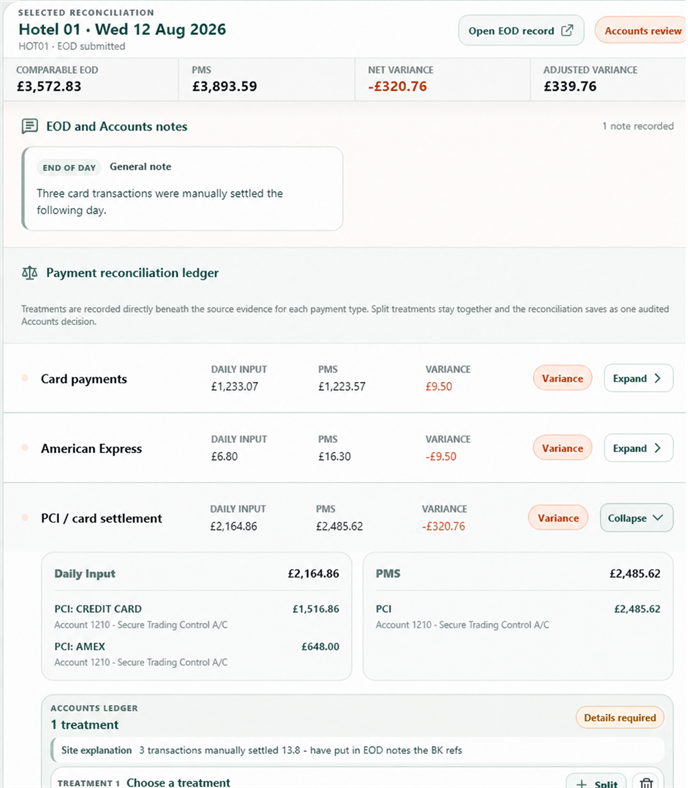
Focus on the differences
Finance can focus on exceptions instead of rebuilding each reconciliation. Every open item retains the site explanation, evidence, Finance decision and next action.
Daturu compares the site’s payment totals with PMS activity for the same business date.
Site staff explain each variance and attach the available evidence.
Finance records the agreed cause, treatment and any correction required.
Corrections and follow-ups remain open until Finance confirms completion.
What is reconciled
Separate totals show Finance exactly where a difference arose instead of hiding it within one combined figure.
Record how each difference was resolved.Mark it as timing, coding, a source correction, an accepted difference or another agreed resolution.
Compare site terminal totals with PMS activity.
Review physical cash, banking and BACS as distinct totals.
Keep non-cash payment types separate from card and cash totals.
Compare supported provider totals with PMS activity.
Connected settlement evidence
For supported providers, Daturu imports settlement totals, compares them with the relevant hotel figures and keeps the source detail available for Finance review.
Timing differences
When a payment appears after the original business date, Daturu carries the difference forward and links the later clearing entry back to the day it came from. Finance can see when it opened, why it arose and when it cleared.
Keep the complete history.The original difference and the later clearing entry stay linked.
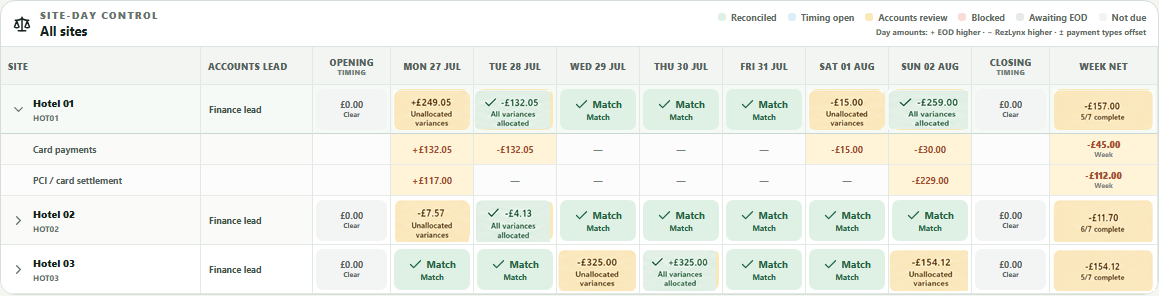
Group-wide status
The weekly tracker shows every expected date for every property. If a site has not submitted, the gap remains visible even when no journal activity has arrived.
Complete review history
If source data changes or Finance revises a decision, Daturu keeps the earlier version and records what changed.
Resolve payment differences sooner
See how Daturu keeps each variance, decision and follow-up under Finance control.